The-Y sends and receives SMS through your own SMS provider ("bring your own credentials") — no markup, you pay your provider directly. In this guide you enter the API credentials, send a test SMS and set up receiving replies.
⏱ approx. 10 min · Permission “Manage settings” (admin) · Free & Paid · As of version 1.1.26
Send and receive. Outbound — individually from the inbox and as a campaign — and inbound: once you enter the receiving address at your provider, replies land in the inbox and “STOP” unsubscribes automatically (see Receiving replies & STOP).
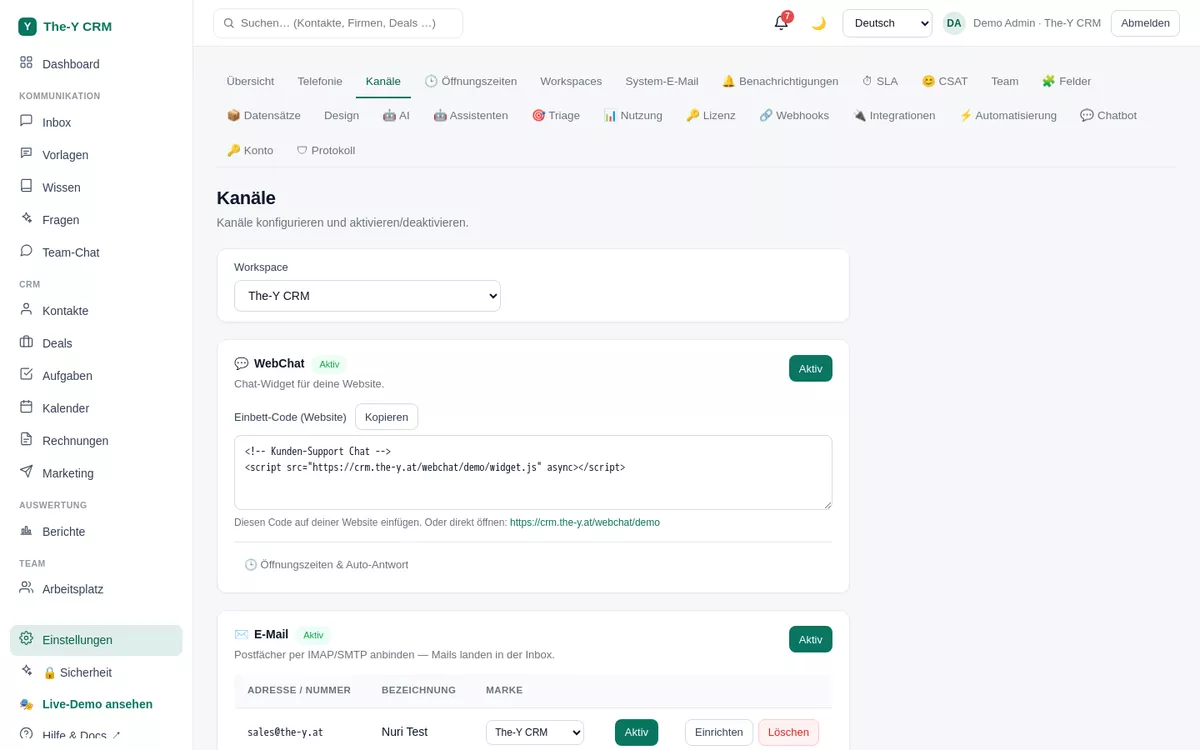
Settings → Channels — where you add the SMS account.
Before you start — what you need
An account with an SMS provider that has a REST API. The-Y targets the common SMStools format (headers X-Client-Id / X-Client-Secret); the API base URL is freely configurable, so compatible providers work too.
From the provider: a client ID and client secret (API credentials) plus the API base URL.
A sender (sender ID) — depending on country/provider a short code, a name or a number (must be enabled at the provider).
Step by step
Open channels.Settings → Channels; with multiple brands, pick the right brand at the top.
Add an SMS account. Under "Mailboxes & numbers" click "+ Add" → type SMS. The set-up panel opens.
Enter the credentials.
API base URL of your provider (e.g. https://api.your-provider.tld)
Client ID and client secret — stored encrypted (AES-256)
Sender (sender ID)
Send a test SMS. Click "Send test SMS" and enter a destination number (e.g. your own phone). The-Y calls the provider API live; an error message (e.g. 401 Invalid Credentials) comes straight from the provider — see Troubleshooting.
Save & activate. The SMS account is now active and available as a channel in "New chat" and in marketing.
Receiving replies & STOP
Create a receiving address. In the SMS account's set-up panel, in the “Incoming SMS & STOP” section, click “Create receiving address”.
Enter it at your provider. Copy the address and enter it at your SMS provider as the webhook for incoming messages — usually under Settings → Webhooks → incoming messages.
Done. Your customers' replies land in the inbox. If someone writes “STOP”, “STOPP”, “ABMELDEN” or “UNSUBSCRIBE”, they are unsubscribed from SMS (with a note in the conversation); “START” or “ANMELDEN” subscribes them again.
The receiving address is secret — don't share it. “Create new address” invalidates the old one; then enter the new one at your provider. On STOP The-Y sends no confirmation SMS, and there are no delivery reports for SMS.
Sending SMS
Individually: In the inbox click "+ New chat", pick a contact, channel SMS, write the message, send. (Consent is respected — unsubscribed contacts don't appear.)
As a campaign: Under Marketing create a campaign with channel SMS (segment, placeholders like {firstname}). See the marketing guide.
Consent
On the contact page you see per channel whether consent was given — with date and source. SMS campaigns only go to contacts with explicit consent; "New chat" and marketing automatically exclude contacts unsubscribed from SMS. More: Consent, STOP & unsubscribe.
Troubleshooting
401 Invalid Credentials
Client ID or client secret is wrong, or the API base URL is incorrect. Check the values in the provider dashboard and re-enter them. The message comes 1:1 from the provider — which means the connection itself is fine.
"Sender not allowed" / SMS doesn't arrive
Many countries/providers require a registered sender (sender ID). Have your sender enabled at the provider or use an allowed number/short code. Also check your provider balance.
Replies don't arrive in the inbox
Check that the receiving address is entered at the provider as the webhook for incoming messages (not for delivery reports) and that you entered the new address after “Create new address”. The SMS account must be active.
My provider isn't SMStools
If the provider's API is compatible with the SMStools scheme (headers X-Client-Id/X-Client-Secret, JSON endpoint), just adjust the API base URL. Otherwise write to us at office@the-y.at — further provider adapters are possible.